
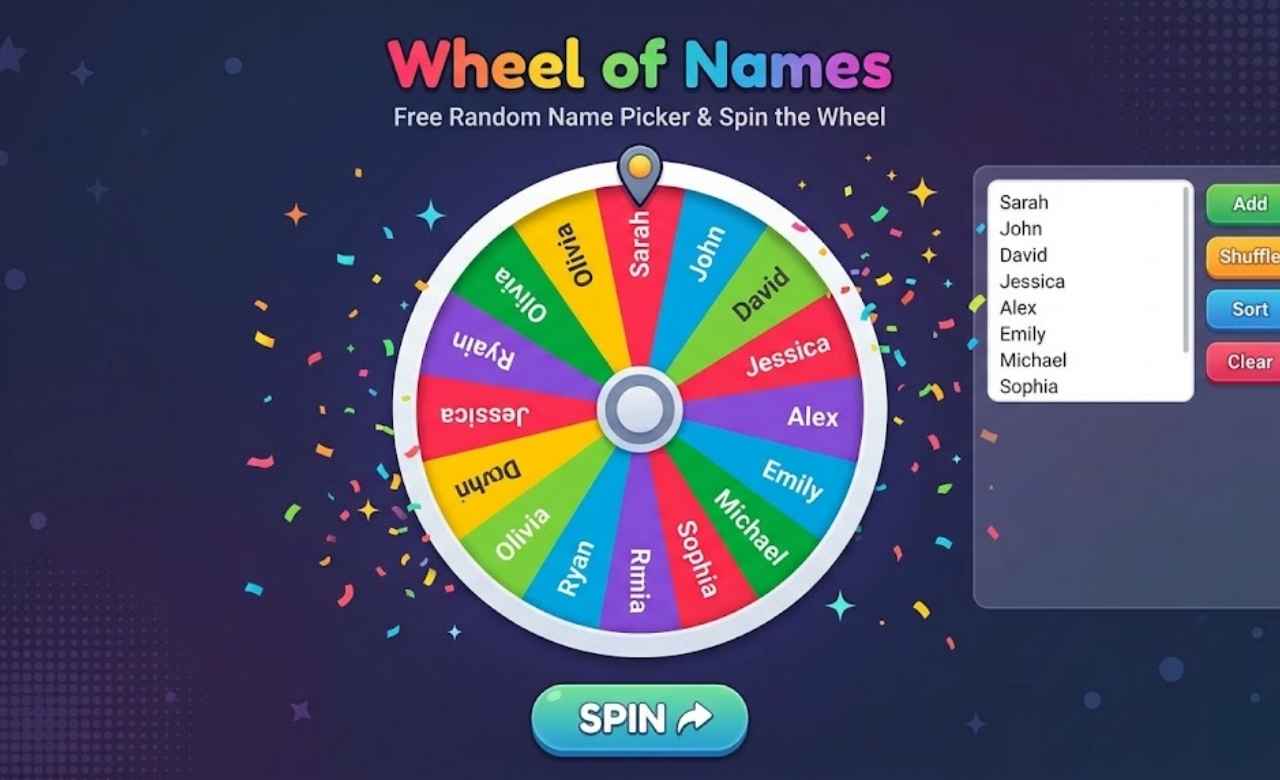
Tired of wasting time making decisions or choosing names from a long list? Make every selection exciting, quick, and effortless with the Wheel of Names, a fun and interactive tool that lets you pick random names, choose winners, and make decisions with a simple spin. Whether you’re a teacher selecting students, hosting a giveaway, or planning a game night, this free random name picker brings fairness and excitement to every choice.
Unlike manually drawing names, a name wheel makes the entire process more engaging and easy to follow. Need to make a quick decision? Try a yes no wheel for simple choices, explore a google spinner for random selections, or use a picker wheel to choose from multiple options. Just enter your names, spin the wheel, and see where it lands. No complicated steps—just a fun, simple way to let chance decide.
Wheel of Names
Making quick, unbiased decisions in front of an expectant audience has always carried friction. Whether calling on quiet students in a crowded lecture hall, selecting a grand prize winner on an Instagram live stream, or sorting out household chores, the manual selection process invites second-guessing. Traditional approaches slips of folded paper pulled from a bowl, quick coin tosses, or blind finger-pointing—feel tedious and open the door to accusations of favoritism.
Digital tools have replaced those analog bottlenecks. At the center of that shift sits the Wheel of Names, a browser-based, high-utility random name picker that turns arbitrary group selection into an engaging, visual event. With a single click to spin the wheel, participants watch suspense build in real time as the needle clicks through colored segments before decelerating onto a single entry.
This guide delivers an exhaustive, hands-on breakdown of how modern name wheels operate under the hood, how to configure custom rules for high-stakes draws, and how to maximize the platform across classroom, workplace, and promotional environments.
What Is Wheel of Names and How Does It Work?

The Wheel of Names is an interactive, web-based digital name picker engineered to execute unbiased selections across arbitrary data sets. Users populate an input field with names, numbers, words, or emoji tags, and the software programmatically renders those inputs onto a circular canvas divided into equal radial wedges.
       [ Input: Names / Items List ]
                    │
                    ▼
       [ Radial Partitioning Engine ]
                    │
                    ▼
     [ CSPRNG Cryptographic Seed Generation ]
                    │
                    ▼
     [ CSS3 / HTML5 Canvas Deceleration Curve ]
                    │
                    ▼
         [ Verified Unbiased Outcome ]
The underlying architecture relies on the HTML5 Canvas API and modern vector graphics rendering engines. When a user enters twenty names, the canvas dynamically calculates the internal sector angles:
$$\theta = \frac{360^\circ}{n}$$
For twenty entries, the tool allocates an 18° arc per segment. The system then binds distinct visual themes—such as alternating HEX color palettes, high-contrast typography, and sector boundaries—across the circumference.
The operational pipeline runs directly in your local browser client:
- Array Parsing: The text field accepts a raw data string separated by line breaks, sanitizing the values, removing blank lines, and calculating total entries ($n$).
- Dynamic Geometry Calculation: The application plots equal slices around a central pivot point $(x, y)$.
- Seed Generation: Upon triggering a spin, the engine queries an internal pseudorandom or cryptographically secure random number generator to select the winning index before or during the animation.
- Physics Emulation: The interface triggers a multi-revolution rotational transform, applying a cubic-bezier easing algorithm ($t \to 0$ deceleration) that mirrors physical angular friction.
- Pointer Detection & Callback: As the rotational angle settles against the stationary top marker, an event listener flags the target slice, rendering a victory banner, playing an audio clip, or launching a confetti overlay.
Because modern client-side execution takes place without continuous server latency, the online spinning wheel updates instantly whether populated with three choices or hundreds of entries.
How to Use the Wheel of Names Random Name Picker
Getting started with a free online name picker requires no specialized software, coding knowledge, or technical configuration. The web application operates on any modern web browser across Windows, macOS, ChromeOS, iOS, and Android.
1. Navigating the Interface
The primary layout features two main functional panels:
- The Visual Canvas (Left/Center): Displays the active, color-coded picker wheel, the pointer indicator needle, and the primary interactive trigger.
- The Data Editor (Right/Side Panel): Contains the entry field, entry counter, quick-action controls, and configuration tabs for audio, themes, and behavior.
+------------------------------------------+-----------------------+
|                                          | [Entries] [Customize] |
|                  \ | /                   |-----------------------|
|                -- (O) --                 | Alice                 |
|                  / | \                   | Bob                   |
|                                          | Charlie               |
|            [ CLICK TO SPIN ]             | Diana                 |
|                                          | Evan                  |
+------------------------------------------+-----------------------+
2. Basic Operational Workflow
Executing a clean draw follows three basic steps:
- Step 1: Populate Entries. Click inside the text box on the right. Delete any default placeholders and paste or type your list. Each line represents an individual sector.
- Step 2: Review Sector Distribution. Check the rendered wheel to verify that every item appears cleanly. If an entry is exceptionally long, shorten it or reduce font sizes inside the configuration settings so labels remain readable.
- Step 3: Execute the Spin. Click anywhere on the wheel’s face or strike the Spacebar on a desktop keyboard to activate the rotation.
Once the wheel comes to a complete rest, an alert modal announces the winning entry alongside contextual options, allowing you to either close the alert or remove that entry from subsequent rounds.
How to Spin the Wheel to Pick a Random Name
Initiating a spin on a customizable name wheel looks simple, but mastering the tool means using shortcuts, controlling animations, and running structured multi-stage selections.
       [ Spacebar / Click ]
                 │
                 ▼
       [ Acceleration Phase ]  ──► Reaches maximum angular velocity
                 │
                 ▼
       [ Friction Easing Phase ] ──► Linear or Cubic-Bezier curve
                 │
                 ▼
       [ Audio Ticks Sync ]   ──► Needle clatter matches sector boundary pass
                 │
                 ▼
       [ Dead Stop Verification] ──► Target segment locked at marker
Triggering Rotations
- Mouse/Trackpad Interaction: Hover over the center hub or any wheel sector; your pointer turns into an action hand. A single left-click triggers the spin sequence.
- Keyboard Hotkeys: In fast-paced settings like a classroom or team standup, pressing the Spacebar immediately triggers the rotation without touching the mouse.
- Touch Controls: On tablets, touch displays, and smartphones, tapping the center of the wheel initiates the physics loop.
Mechanics of the Spin Cycle
The rotation sequence runs through three distinct operational phases:
- The Launch (Acceleration): The wheel spins from dead stop to maximum angular velocity within 300 to 500 milliseconds.
- The Run (Sustained Momentum): The engine executes a predetermined number of full 360-degree rotations, keeping the final outcome unpredictable to the audience.
- The Deceleration (Ease-Out): The animation curve transitions to a friction curve. Sound effects stay synchronized with sector dividers passing the stationary pointer needle.
If you need to accelerate the process during large draws, you can adjust the spin duration in the settings menu from the standard 10 seconds down to a rapid 1-to-3-second cycle.
Why Use a Free Online Wheel of Names?
Manual drawings can easily lead to awkward moments: folded papers cling together inside a bowl, handwriting can be unreadable, and someone always wonders if the drawing was rigged. A free wheel spinner removes those issues through transparent, auditable randomization.
Manual Drawing                  Digital Spin Wheel
┌───────────────────────────┐   ┌───────────────────────────┐
│ [Paper Slips in a Jar]    │   │ [Browser Engine Canvas]   │
│ - Hidden from audience    │   │ - Fully visible to all    │
│ - Inconsistent mixing     │   │ - Cryptographic RNG seed  │
│ - Clinging papers         │   │ - Instant dynamic odds    │
│ - Manual tallying         │   │ - One-click name removal  │
│ - Time-consuming setup    │   │ - Instant copy/paste list │
└───────────────────────────┘   └───────────────────────────┘
Complete Visual Transparency
Physical drawings happen out of view inside a box or hat. A digital spinning wheel projects the entire process directly onto shared displays, Zoom screens, or classroom smartboards. Every participant can confirm their name is listed on a slice of equal size before the spin begins.
Effortless Setup
Organizing 150 paper raffle tickets takes significant time. With a digital random entry picker, you simply copy a column from an Excel sheet, Google Sheet, or CSV export, paste it into the entry box, and spin within seconds.
Zero Cost and No Software to Install
The best free online wheel spinner with names requires no account creation, monthly subscriptions, or software downloads. It runs directly inside any standards-compliant browser, eliminating corporate firewall blocks or IT hurdles.
Key Features of Our Random Name Picker Wheel
A purpose-built random wheel spinner brings together performance, flexible customization, and straightforward controls:
| Core Feature | Technical Specification | Practical Benefit |
| Dynamic Array Ingestion | Supports 2 to 2,000+ entries | Handles small groups and large digital giveaways with equal ease |
| Non-Repeating Mode | One-click entry removal logic | Prevents repeat winners without requiring manual list edits |
| Configurable Spin Timing | Range: 1 to 60 seconds | Speeds through routine tasks or draws out high-stakes giveaway suspense |
| Dynamic Color Engine | Custom HEX, presets, high-contrast | Matches corporate branding, school colors, or holiday themes |
| True Canvas Scalability | Vector rendering up to 4K resolutions | Delivers clean visuals on mobile phones, monitors, and projectors |
| Acoustic Feedback Sync | Real-time audio synthesis | Mimics the mechanical clatter of physical carnival prize wheels |
| Cloud Save & Deep Linking | URL state encoding / cloud storage | Lets you save and share pre-built wheels with colleagues via direct links |
| Input Flexibility | UTF-8, multi-language, and emoji support | Works seamlessly with international character sets and image icons |
How to Add, Edit, and Remove Names from the Wheel
Managing your roster inside the name wheel spinner takes only a few keystrokes. The text field treats every line as an independent item on the wheel.
Raw Input Data:                 Canvas Transformation:
+------------------------+      +------------------------+
| Marcus Vance           |      |  Sector 1: 0° - 72°     |
| Sarah Jenkins          | ───► |  Sector 2: 72° - 144°   |
| Elena Rostova          |      |  Sector 3: 144° - 216°  |
| David Kim              |      |  Sector 4: 216° - 288°  |
| Chloe Al-Mansoor       |      |  Sector 5: 288° - 360°  |
+------------------------+      +------------------------+
Adding Entries
- Click the text box on the control panel.
- Type or paste your items, placing each on its own line:
Plaintext
Marcus Vance
Sarah Jenkins
Elena Rostova
David Kim
Chloe Al-Mansoor
- To assign higher odds to an individual without typing their name repeatedly, duplicate the line. Entering “Marcus Vance” across four separate lines quadruples his visual slice size and mathematical odds relative to single entries.
Editing Entries
Click the specific line inside the text panel to fix typos, add initials to distinguish duplicate first names, or append team names. The canvas re-indexes and balances all slices instantly.
Removing Entries
- Manual Deletion: Highlight any name in the text box and press Backspace. The sector disappears, and the remaining slices expand to fill the circle.
- Post-Spin Removal: When a winning entry lands, click Remove inside the announcement modal. The tool drops that name, recalculates slice dimensions, and prepares the wheel for the next draw without repeat picks.
How to Customize Your Wheel of Names
Transforming a generic decision wheel into a polished visual tool requires only a few tweaks in the settings panel.
               [ Customization Matrix ]
                          │
       ┌──────────────────┼──────────────────┐
       ▼                  ▼                  ▼
 [ Visual Styling ]   [ Motion & Time ]  [ Sound & FX ]
 - HEX Themes         - Spin Duration    - Ticking Audio
 - Image Hub Logos    - Max Names Shown  - Victory Fanfare
 - Custom Typography  - Easing Curve     - Confetti Cannons
1. Color Palettes and Sector Themes
Switch between clean, practical color schemes to fit your setting:
- Corporate & Formal: Navy, Slate Gray, Cool White, and Deep Teal.
- Classroom & Energy: Primary Red, Vivid Blue, Canary Yellow, and Kelly Green.
- High Contrast / Accessibility: Alternating pure black and high-luminosity yellow with bold sans-serif text to keep labels legible for visually impaired users.
- Custom Branding: Input your company’s exact HEX codes to mirror official brand guidelines.
2. Audio Effects
Audio feedback adds weight and excitement to every spin:
- The Ticker: Choose between classic wooden pegs, plastic carnival clicks, mechanical ratchets, or quiet digital beeps.
- The Climax: Select celebratory fanfares, retro 8-bit chimes, stadium cheers, or a muted finish for professional business meetings.
3. Spin Duration and Deceleration Rates
Adjust the spin timer based on your format:
- Lightning Rounds (1 to 3 seconds): Best for picking students during rapid Q&A or sorting teams under tight agendas.
- Standard Rounds (7 to 10 seconds): The sweet spot for suspense, giving audiences time to track the wheel as it slows down.
- High-Stakes Draws (15 to 30 seconds): Ideal for grand-prize marketing giveaways, year-end raffles, and gaming live streams.
4. Background and Center Hub Customization
Drop custom artwork or team logos into the center hub to anchor the design. The pointer needle can also be shifted from the traditional top-dead-center position to the right or left edge depending on your layout.
How to Pick a Random Winner Using the Spin Wheel
Running a transparent drawing requires clear procedures, especially when real prizes, grades, or workplace responsibilities are on the line.
Step 1: Clean Input Data       Step 2: Set Rules Publicly
[ Strip blanks & duplicates ]  [ Declare: 1 spin, auto-remove ]
               │                              │
               └──────────────┬───────────────┘
                              │
                              ▼
Step 3: Screen Share / Project
[ Everyone sees the populated wheel ]
                              │
                              ▼
Step 4: Execute the Spin Sequence
[ Spacebar / Click -> Real-time Deceleration ]
                              │
                              ▼
Step 5: Document Winner & Remove
[ Log result -> Click "Remove" -> Next Round ]
Step-by-Step Drawing Protocol
- Clean Your Data: Copy your entry list into a spreadsheet first. Use text formulas to trim extra whitespace and standardize capitalization.
- Set the Rules Early: Tell your audience how the draw will work before launching the spin. Clarify whether a single spin takes the prize, whether a test spin will run first, and whether previous winners will be removed for subsequent rounds.
- Share Your Screen: In virtual settings like Microsoft Teams, Zoom, or Google Meet, share the specific browser tab rather than your entire desktop to maintain high framerates and clean audio pass-through.
- Trigger the Spin: Click the hub or press the Spacebar. Let the animation finish completely on its own; interrupting the script can cast doubt on the outcome.
- Acknowledge and Remove: Once the winner modal appears, screenshot the confirmation or log the name, click Remove, and move directly to the next draw.
Is the Wheel of Names Fair and Truly Random?
When people miss out on a prize or get picked for a tough assignment, they naturally question the results. Understanding the underlying randomization helps you explain why a random selection tool delivers fair, defensible picks.
       Physical Computing Noise / System Entropy
                          │
                          ▼
        Crypto.getRandomValues() / PRNG
                          │
                          ▼
            Float Normalized: [0.0, 1.0)
                          │
                          ▼
         Mapped to Index: floor(Random * n)
                          │
                          ▼
        Angular Stop Coordinate: θ = Index * (360 / n)
The Mathematics of Digital Randomization
Client-side web applications generate random values using deterministic mathematical algorithms known as Pseudorandom Number Generators (PRNGs), or cryptographically secure interfaces via the Web Cryptography API:
JavaScript
// Example of Cryptographically Secure Float Generation
function getSecureRandomFloat() {
    const array = new Uint32Array(1);
    window.crypto.getRandomValues(array);
    return array[0] / (0xFFFFFFFF + 1);
}
The browser queries system-level entropy—such as thermal noise, processor interrupt timings, and mouse micro-movements—to generate unpredictable seed values.
Uniform Distribution vs. Manual Bias
Physical drawings carry hidden biases:
- Folded paper weight differences.
- Thermal variations across capsules in raffle barrels.
- Manual mixing that leaves names grouped together.
A software-driven wheel randomizer distributes mathematical probability uniformly across all entries:
$$P(E_i) = \frac{1}{n}$$
Every entry maintains an identical probability of selection on every spin. The algorithm has no memory: past outcomes never alter future probabilities, eliminating the Gambler’s Fallacy from your drawings.
How to Use Wheel of Names for Classroom Activities
Classroom dynamics shift when cold-calling is replaced by a visual, impartial tool. A dedicated classroom name picker removes the friction of perceived favoritism and keeps students engaged.
                   Classroom Use Cases
                            │
       ┌────────────────────┼────────────────────┐
       ▼                    ▼                    ▼
[ Cold Calling ]     [ Group Sorting ]    [ Activity Wheels ]
- No perceived bias  - Build mixed teams  - Writing prompts
- Equal probability  - Distribute duties  - Vocabulary drill
1. Impartial Cold Calling and Recitation
Traditional participation often leans toward vocal volunteers or puts hesitant students on the spot. Using a random student picker turns calling on the room into a shared game. Students follow the wheel rather than bracing against teacher selection, lowering stress while keeping the entire class attentive.
2. Group Allocation and Seating Charts
Sorting balanced student groups takes time. By running a roster wheel, teachers can place students into project groups on the fly. Simply spin four times to fill Group A, click Remove after each pick, and repeat the process for subsequent teams.
3. Subject-Specific Learning Drills
Replace student names with lesson topics, vocabulary terms, or practice problems:
- Language Studies: Populate the wheel with irregular verbs. The selected student must conjugate the verb across three tenses.
- STEM Drills: Enter mathematical formulas or chemical elements. Students identify the operational properties or valence states.
- Creative Writing: Load the wheel with distinct genres, conflicts, or settings. Students spin twice to combine disparate concepts into an impromptu story premise.
How to Use a Random Name Picker for Giveaways and Contests
Running a giveaway on YouTube, Twitch, Instagram, or TikTok requires total transparency. Disgruntled participants can quickly flood comment sections if they suspect a contest was rigged. Using a giveaway winner picker helps protect your brand’s credibility.
              Giveaway Verification Pipeline
                            │
1. Ingest Entries ──► Pull from comments, forms, or ticket sales
2. Scrub Data     ──► Strip duplicates and invalid entries
3. Public Stream  ──► Project wheel live to audience
4. Record Draw    ──► Archive video for dispute resolution
1. Consolidating Entry Lists
Collect entries through Google Forms, platform comment scrapers, or subscriber databases. Export the records into a clean spreadsheet column, remove duplicate entries (unless bonus entries were earned through specific rules), and copy the final list into the raffle name picker.
2. Live-Streaming the Draw
When running live drawings:
- Announce the entry cutoff time clearly.
- Show the entire names list pasted into the wheel interface on stream.
- Perform a single “Test Spin” if requested, but clearly label it as a test before launching the official prize spin.
- Let the wheel spin for at least 10 seconds to build tension among viewers.
3. Verification and Documentation
Once the random winner picker stops on an entry, record the screen, capture a clean screenshot of the victory dialogue, and cross-reference the name with your eligibility requirements (such as age, location, or contest rules) before announcing the final award.
Fun Games and Activities Using the Wheel of Names
A custom spin wheel works well beyond names and rosters—it can serve as a flexible game engine for icebreakers, family gatherings, and community events.
+-------------------------------------------------------------------+
|                        POPULAR WHEEL FORMATS                      |
+-------------------------------------------------------------------+
|  [ TRUTH OR DARE ]    [ FITNESS CIRCUIT ]   [ TEAM TRIVIA ]       |
|  - Singing a song     - 20 Burpees          - Pop Culture 2000s   |
|  - Confession         - 45s Plank           - World Capitals      |
|  - Text an old friend - 15 Jump Squats      - Film History        |
|  - Wild Dance         - 30 Mountain Climbers- Science & Nature    |
+-------------------------------------------------------------------+
1. Improv Truth or Dare
Replace names with creative challenges, trivia questions, or funny tasks. Players take turns spinning to determine their next action, keeping party games moving smoothly without awkward pauses.
2. Calisthenics and Workout Circuits
Fitness instructors and personal trainers can load exercises into the segments:
- 45-Second Plank
- 20 Kettlebell Swings
- 15 Burpees
- 30 Jumping Jacks
- 60-Second Rest Interval
Spinning the wheel injects variety into high-intensity interval training (HIIT), keeping classes engaged through unpredictable workout orders.
3. Dinner and Movie Selection
End indecision on movie or dinner nights. Add five takeout options or a backlog of streaming titles, spin once, and commit to whatever choice the marker lands on.
How to Create a Custom Spin the Wheel Generator
Building a tailored spin wheel generator lets you design specific decision models for recurring meetings, study groups, or project standups.
Data Ingestion ──► Visual Styling ──► Behavioral Rules ──► Export / URL
(Names/Items)      (Theme/Assets)     (Timer/Audio)        (Save/Share)
Step 1: Establish Your Data Architecture
Organize your entries in a simple text file. For complex lists, group entries by category using emojis or prefix tags:
Plaintext
[Marketing] Alex
[Marketing] Jordan
[Dev] Chen
[Dev] Maya
[Design] Priya
Step 2: Configure Behavioral Variables
Open the options menu and configure your operational rules:
- Set the spin duration to match your meeting’s pace (4 seconds works best for quick morning standups).
- Adjust the maximum number of visible slices if working with large lists to prevent text overlap.
- Select celebratory sounds or mute audio entirely for professional environments.
Step 3: Save, Export, and Share
- URL Encoding: Many tools encode entry lists and color palettes directly into a shareable URL string, letting you bookmark the exact configuration for future use.
- Account-Based Cloud Saving: Create a free profile to save separate wheels for individual classes, teams, or recurring events, accessible from any browser.
Can You Use Wheel of Names on Mobile Devices?
Modern responsive web design ensures the mobile-friendly spinner works smoothly across smartphones and tablets without missing desktop features.
+---------------------------+   RESPONSIVE MOBILE BREAKDOWN:
|        [ = ] Menu         |
|                           |   1. Single-Column Flow:
|           \ | /           |      Canvas auto-scales to screen width;
|         -- (O) --         |      entry lists tuck cleanly underneath.
|           / | \           |
|                           |   2. Touch-Optimized UI:
|     [ TAP TO SPIN ]       |      Replaces small buttons with finger-friendly
|                           |      touch targets and swipe menus.
| - - - - - - - - - - - - - |
| Entries (24)              |   3. Hardware Acceleration:
| + Add New Name...         |      Uses WebGL/GPU rendering for smooth
| Alice, Bob, Charlie...    |      60 FPS animations on battery power.
+---------------------------+
- Touch Optimizations: Desktop mouse clicks translate directly into single-tap gestures. Tap the wheel hub to spin, and tap confirmation buttons to dismiss or remove entries.
- Screen Scaling: The canvas calculates viewport width on the fly, rendering razor-sharp vector graphics whether viewed on a compact 6-inch smartphone or a 12.9-inch tablet.
- Mobile Browser Performance: Sparing use of external frameworks keeps CPU and memory footprints small, ensuring smooth 60 FPS animations on older devices without draining battery life.
Wheel of Names vs. Other Random Name Picker Tools
Choosing the right selection utility depends on your specific format, audience size, and display setup. Here is how the wheel format stacks up against common alternatives:
| Selection Method | Audience Suspense | Setup Complexity | Transparency Level | Best Practical Application |
| Wheel of Names | High (Visual Deceleration) | Low (Instant paste) | Complete (Visual & Open) | Classrooms, Live Stream Giveaways, Meetings |
| Hat / Jar Drawing | Medium (Physical Reach) | Medium (Cutting paper) | Moderate (Susceptible to sleight of hand) | Intimate family gatherings, board games |
| CLI / Script Selector | None (Instant terminal dump) | High (Requires runtime) | Zero (Opaque to non-technical audiences) | Backend database processing, system admin |
| Digital List Shuffler | Low (Instant re-ordering) | Low (Paste & click) | Moderate (No rotational drama) | Rapid multi-team drafting, blind brackets |
| Electronic Egg Timer | High (Auditory beep) | Low (Dial turn) | Low (Time-based, not roster-based) | Speed dating, lightning presentations |
While basic random list generators spit out a winner instantly, they lack the engagement of a spinning wheel. The gradual slowing of the wheel builds shared anticipation, making the selection process an enjoyable moment for everyone watching.
Benefits of Using a Random Name Generator Online
Adopting a random choice generator across your personal, educational, or professional routines delivers distinct advantages:
                  Primary Operational Benefits
                               │
       ┌───────────────────────┼───────────────────────┐
       ▼                       ▼                       ▼
[ Eliminates Bias ]    [ Boosts Engagement ]   [ Streamlines Admin ]
- Mathematical equality - Visual suspense        - Instant copy/paste
- Zero favoritism       - Gamified tasks         - Automatic tracking
- Eliminates Human Bias: Even well-intentioned leaders subconsciously favor certain individuals. An algorithm removes personal preference entirely, treating every participant equally.
- Transforms Passive Audiences: Watching a needle skip across entries turns routine selection into a shared, gamified experience that holds group attention.
- Speeds Up Group Administration: No one needs to spend time folding paper slips, maintaining physical jars, or tracking complex spreadsheets. You can configure and run draws in seconds.
- Establishes Clean Audit Trails: Showing names live on screen reassures participants that the draw is legitimate, protecting organizers from accusations of unfair selections.
Common Problems When Spinning the Wheel and How to Fix Them
Even lightweight browser tools run into occasional snags. Here is how to diagnose and resolve common issues:
Symptom:                     Probable Root Cause:          Target Solution:
┌───────────────────────┐    ┌────────────────────────┐    ┌───────────────────────────┐
│ Animation Stutters    │───►│ Hardware Acceleration  │───►│ Enable GPU Acceleration   │
│ Label Overlap         │───►│ Entry Volume Overload  │───►│ Adjust Font / Max Display │
│ Audio Sync Lag        │───►│ Browser Thread Throttling│─►│ Unmute Tab / Single Window│
│ Lost Entry Lists      │───►│ Cache Purge / Incognito│───►│ Save Shared URL / Cloud   │
└───────────────────────┘    └────────────────────────┘    └───────────────────────────┘
1. Frame Rate Drops or Jittery Spins
If the wheel stutters while decelerating:
- Open your browser’s settings menu and verify that Hardware Acceleration is enabled.
- Close resource-heavy background applications, such as video editors or multi-tab streaming sessions, to free up system memory.
- Reduce your display resolution if projecting to external 4K monitors through underpowered adapters.
2. Labels Overlap on Large Lists
When spinning lists with more than 100 entries, text can become crowded:
- Head to the customization panel and switch entry labels from full names to initials or short IDs.
- Lower the base label font size.
- Enable settings that display only the current section under the pointer rather than trying to render every single text string at once.
3. Missing Audio Clicks
If the wheel spins in complete silence:
- Confirm that modern browser autoplay policies have not automatically muted the tab.
- Click anywhere inside the document window to register user interaction, unlocking audio playback permissions.
- Verify your operating system’s active audio output routing.
4. Lost Entry Rosters After Closing the Tab
Working in private or incognito windows purges local storage as soon as the session closes:
- Keep a master backup of your roster in an external document or spreadsheet.
- Use the application’s cloud save feature or generate an encoded share URL to preserve your wheel’s setup long term.
Tips for Getting the Most Out of Your Name Picker Wheel
Taking advantage of a few overlooked features can make your presentations and drawings run even smoother:
+-------------------------------------------------------------------------+
|                       POWER-USER BEST PRACTICES                         |
+-------------------------------------------------------------------------+
|  [ WEIGHTED ENTRIES ]       [ OBS INTEGRATION ]     [ KEYBOARD DRILLS ] |
|  Paste an entry 3x to give  Use Browser Source with Use Space to spin   |
|  them 3x the slice size and transparent backgrounds and Esc to clear    |
|  proportional odds.         for live streams.       winner modals fast. |
+-------------------------------------------------------------------------+
1. Build Weighted Odds
Equal slices work for standard draws, but some situations call for weighted chances—such as rewarding ticket tiers in raffles or giving extra entries for good attendance. Instead of looking for complex percentage settings, simply paste the individual’s name onto multiple lines. An entry listed three times naturally gets three times the wheel surface area and a 3x higher probability of winning.
2. Streamline Controls with Hotkeys
Keep your presentation moving by using keyboard shortcuts instead of hunting for buttons:
- Spacebar: Triggers the spin sequence immediately.
- Escape: Dismisses the winner alert modal.
- Ctrl/Cmd + Enter: Opens the options or text editor panels directly.
3. Set Up Clean Live Stream Overlays
When broadcasting on Twitch, YouTube, or Facebook Live via software like OBS or Streamlabs, add the wheel using a Browser Source capture rather than standard desktop window captures:
- Set the source background color to transparent using CSS hooks:
CSS
body { background-color: rgba(0, 0, 0, 0); overflow: hidden; }
- Crop out side configuration panels, displaying only the spinning circle and indicator needle directly over your camera feed.
4. Keep an Archive of Clean Seed Lists
Do not rely on browser cache to store essential rosters. Keep an organized folder of plain text files on your computer:
Period-1-Class-Roster.txtAll-Hands-Team-Members.txtVIP-Customer-Giveaway.txt
When meeting time arrives, copy and paste the clean text directly into the entry field. You will be set up and ready to spin in seconds.
Frequently Asked Questions
What is Wheel of Names?
Wheel of Names is an online random name picker that places names or items onto a visual, color-coded wheel. Clicking the wheel spins it through a physics-based animation, picking a completely random entry when it stops.
How does the Wheel of Names work?
The tool takes your list of entries, divides a circle into equal slices, and uses random number generation algorithms combined with smooth deceleration animations to land on an unbiased winning sector.
Is Wheel of Names free to use?
Yes. The platform is completely free to use directly in your browser, without requiring account registration, software downloads, or paid subscriptions.
How do I spin the wheel to pick a name?
Click anywhere on the wheel canvas, tap the center hub, or press the Spacebar on your keyboard to launch the rotational spin.
Can I add my own names to the wheel?
Yes. Paste or type your custom list into the text box next to the wheel. Every individual line creates a dedicated slice on the canvas.
Is the Wheel of Names truly random?
Yes. The tool relies on internal mathematical algorithms and system entropy via browser-level random number generators, ensuring every slice maintains an equal mathematical chance of being selected.
Can I use Wheel of Names for giveaways?
Yes. It is widely used by content creators, educators, and organizations to run transparent prize drawings, raffles, and giveaways during live streams and presentations.
How do I customize a random name picker wheel?
Open the settings panel to change slice colors, adjust spin durations, switch out ticking and fanfare audio effects, add background images, or include custom center logos.
Can I use Wheel of Names on my phone?
Yes. The responsive design adapts seamlessly to mobile screens on iOS and Android, allowing you to edit names and spin using simple touch controls.
How do I create a random name spinner?
Type your entries into the text panel, choose your preferred colors and sounds in the settings menu, and begin spinning. You can bookmark the generated link or use cloud save to keep your wheel for future use.
Can I remove a winner after each spin?
Yes. When the winner modal appears, click the Remove button. The tool automatically deletes that entry from the list and balances the remaining slices for the next spin.
What is the best free random name picker?
Wheel of Names is widely considered a top choice thanks to its clean interface, support for thousands of entries, extensive customization, and lack of paywalls.
Can teachers use Wheel of Names in classrooms?
Yes. Teachers use it daily to call on students fairly, divide classrooms into project groups, assign chores, and run interactive study games.
How do I select a random winner fairly?
Share your screen so everyone can see the wheel, confirm the full list of entries is visible, and run the spin live in front of your audience without interrupting the animation.
Can I save and share my custom spinning wheel?
Yes. You can save your wheel to a free account profile or use the share tool to generate a unique link containing your exact list, colors, and configuration settings.
The Wheel of Names brings together transparency, practical customization, and straightforward design. Whether you are running a high-stakes online giveaway, managing classroom discussions, or making quick team decisions, this online wheel spinner removes personal bias and keeps audiences engaged from the moment it starts spinning to the final celebratory chime.
Conclusion
Making random selections doesn’t have to be complicated or boring. The Wheel of Names offers a simple, fun, and interactive way to pick names, choose winners, and make everyday decisions in seconds. Whether you’re organizing classroom activities, running giveaways, playing party games, or settling friendly debates, this free online tool makes the process quick and exciting.
From using a name wheel for random selections to trying a yes no wheel for quick decisions, spinning wheels offer an entertaining alternative to traditional methods. If you’ve explored a google spinner or another picker wheel, you’ll appreciate how easy it is to turn a list of choices into an engaging spinning experience.
Ready to leave your next decision to chance? Enter your names or options, spin the wheel, and discover your random result. Make every choice more exciting with the Wheel of Names. Read other article OTG Meaning

Welcome to NameInBible. I am Victoria, a Christian writer passionate about exploring biblical name meanings, Scripture-based insights, and powerful prayers. My goal is to help readers discover the spiritual significance of names and grow closer to God through faith-filled content.